
PROJECT CREATORS: How do I know if talent has been selected for multiple roles?
This article is for Casting Directors and Project Creators. It explains how to identify if talent has already been submitted or selected for other roles within your project using the Multiple Selection Banner, ensuring you avoid selecting the same talent for conflicting roles.
Identifying Status Banners
Talent submitted or selected for multiple roles will now be flagged directly on the submissions page to help you track their status across your project.
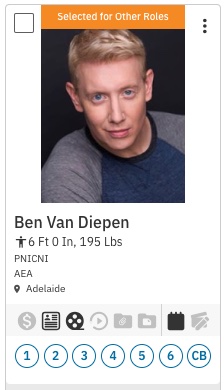
If you have already selected a talent for another role, an orange banner stating Selected for other roles will appear at the top of the headshot.
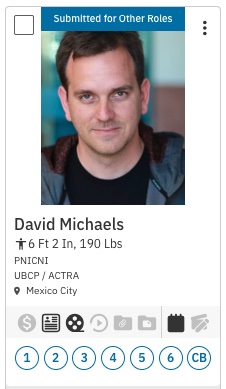
Any talent that is submitted on multiple roles but not yet selected for any will present the blue banner Submitted for other roles.
Selection Warnings
To help manage your casting decisions, the system will alert you if you attempt to move a talent forward who is already engaged in another role.
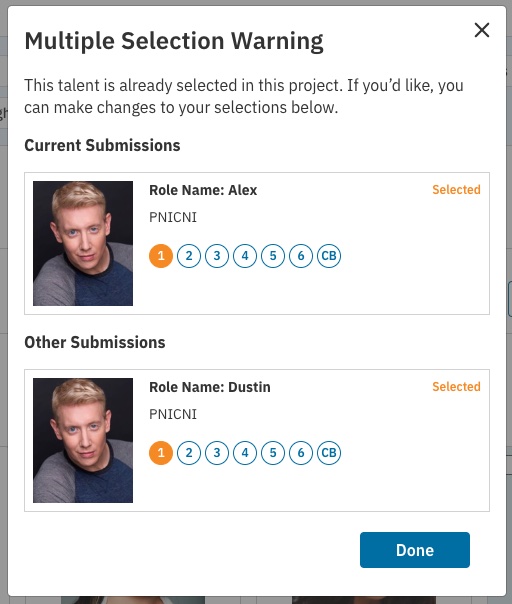
If you select a talent for a role that has already been selected for another role, the following warning will appear:
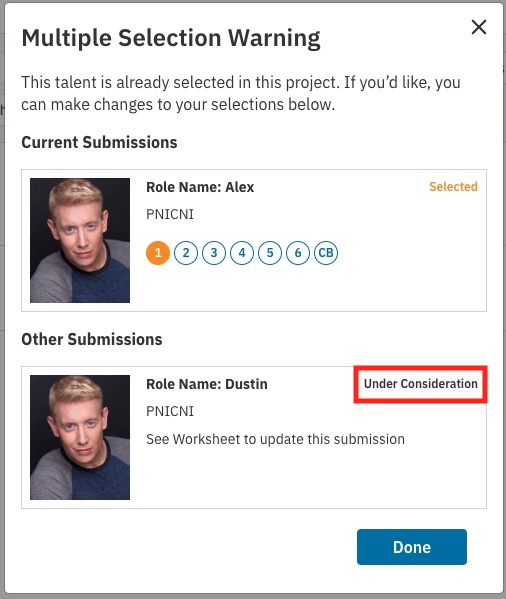
If you select a talent for a role that has already been added to a Media Request, Audition, or Schedule for another role, the following warning will appear:
Deselect Warnings
The system also tracks status changes to keep your workflow clear. If you select a talent for a role that has already been selected or is under consideration for another role, and then deselect them, the following warning will appear:
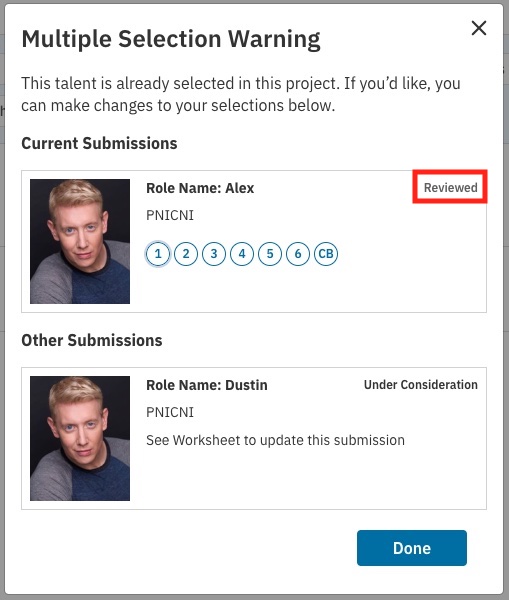
*Please note this warning will only appear for talent when multiple profiles are connected to the same talent account.