
PROJECT CREATORS: What is the Activity Log?
Edited
This article explains the purpose of the Activity Log and provides steps on how to view the history of actions taken on a talent's submission within your project.
Understanding the Activity Log
The activity log is designed to keep you informed about the history of a submission on your worksheet.
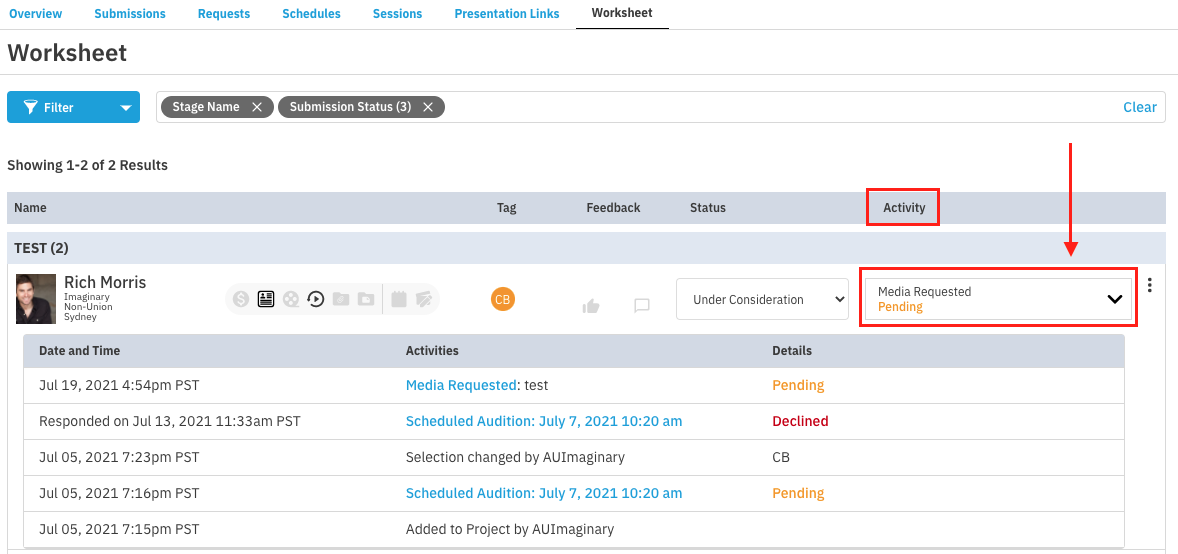
The log displays each action taken within a project on a talent’s submission, listing who performed the action and when.
It documents history as far back as the initial submission itself.
Any time a talent is selected, added to a request of any kind, or added to a presentation, it will be recorded here.
How to View the Activity Log
To access the history of a submission, follow these steps:
Go to your project's Worksheet.
Locate the Activity column.
Click the section within the Activity column to open the log.
Casting
Activity Log
Project Creator
Was this article helpful?
Sorry about that! Care to tell us more?