TALENT REPRESENTATIVE: How can I allow talent's responses to media requests (ie. self tapes) go directly to Casting?
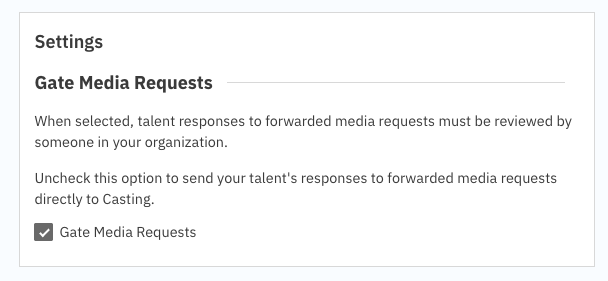
This article is for Talent Representatives and explains the Gate Media Requests feature. This setting allows you to control whether your talents' responses to media requests (like self-tapes) go directly to casting or are 'gated' (held) for your review first.
What is the "Gate Media Requests" Feature?
When talent responds to media requests (ie. self tapes) that you've forwarded to them, you have the option to allow that response to go directly to casting or be 'gated' until you review them and choose to forward it to casting.
By default, Gate Media Requests is turned OFF. This means talent responses to forwarded media requests will go directly to casting. Currently, this setting applies to the specific division.
If you would like your talents’ responses to not go directly to casting, and require you to review talent’s response before casting can see it, you must turn ON (check the check box) for Gate Media Requests.
How to Adjust the "Gate Media Requests" Setting
Note: Only an Admin account for your company has the permission to turn media request gating on or off. If your company or a division would like the ability to turn this feature on or off, please contact our Support team and we can designate you or someone at your company as an Admin so you may control this.
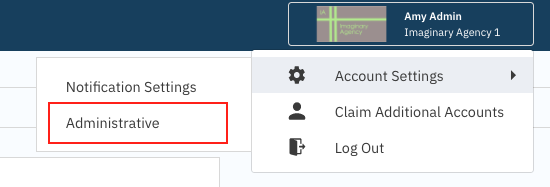
When logged into your account, select your name on the top right corner and go to Account Settings.
Select Administrative.
Adjust the Gate Media Requests setting by checking it on or off, then press Save.