
CASTING DIRECTORS: What does the Find Additional Talent button do?
This article explains how you can use the Find Additional Talent button to search the database using criteria that matches your role.
Using the Find Additional Talent button
You can search for talent in the Casting Networks database via the Suggestions tab on a specific role.
To view the Suggestions tab:
Go the Submissions section on a project.

Select the Find Additional Talent button

The search filter will automatically default to autofill by role criteria and talent profiles will populate. Scroll down to see talent profiles.
Note: You can update and adjust the filters. Enter the criteria you want to filter by and select Filter.

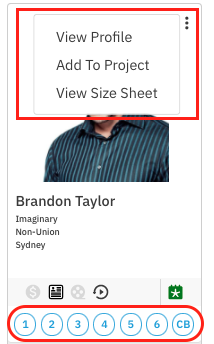
You can View Profile, Add to Project and/or View Size Sheet. To add the talent to your Selects for the role you are in, make a selection by choosing 1 - 6 or CB (callback).
Searching the General Database
If you are not working within a specific role and want to search the general database, please see How do I search the Talent Database?