
PROJECT CREATORS: Can I edit the details of my project?
This article explains how Project Creators can edit project details while the project is still in a Draft status or has Changes Requested. It covers editing the general overview and specific roles to ensure your project is ready for approval.
Please Note: Projects with a status of Under Review or Active cannot be edited. If your project is already approved and you need to make changes, you will need to either create a new project or add a new role to your current project and close submissions on the original role.
How to Edit a Project Overview
If your project is in Draft mode or has Changes Requested, follow these steps to update the main details.
Click on the desired project to open it.
Navigate to the Overview tab.
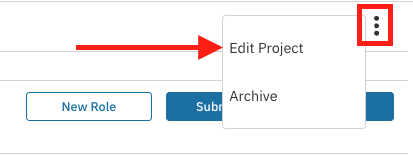
Click the overflow menu (⋮) located at the very top-right corner of the screen.
Select Edit Project from the dropdown menu.
Make your necessary changes.
If your project had changes requested, ensure you submit those changes to our approvals team for review.
How to Edit a Role
To update specific roles within an unpublished project, use the steps below.
Click on the desired project.
From the Overview tab, locate the unpublished role that you want to update.
Navigate to the far right of that specific role row.
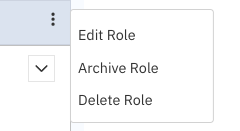
Click the overflow menu (⋮) and select Edit Role.
Make the necessary edits to the role.
Select Save.
Important: Be sure to hit Submit the Project for Approval on the overview page to activate your roles!

You are all set!