
CASTING DIRECTORS: Where do I find all of the Project Information I entered?

Edited

This article explains how to view collapsed project details after creation. This ensures you can access all necessary information regarding your specific project.


Expanding Project Information

Once you have created your project, the project level information is collapsed by default.

To expand and view the project information:

  1. Click on the project name.

  2. Click on the caret to the right of the project name.
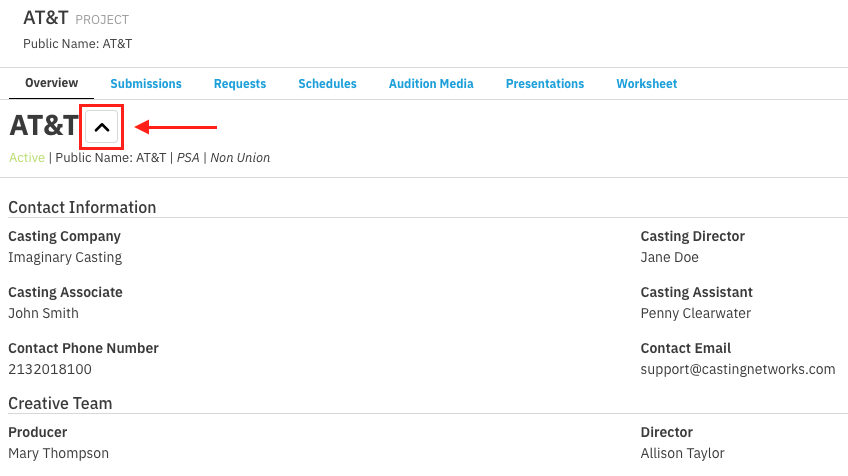
A screenshot of a project page, likely a casting or production management tool, for a project named AT&T. The page has several tabs across the top: Overview, Submissions, Requests, Schedules, Audition Media, Presentations, and Worksheet. The AT&T logo is prominently displayed below the tabs, next to an upward-pointing arrow inside a box, and a long red arrow points from the boxed arrow to the right, indicating a navigational element. Below the title, the project is marked as Active | Public Name: AT&T | PSA | Non Union. The section titled Contact Information lists details: Casting Company: Imaginary Casting, Casting Director: Jane Doe, Casting Associate: John Smith, Casting Assistant: Penny Clearwater, Contact Phone Number: 2132018100, and Contact Email: support@castingnetworks.com. The Creative Team section lists Producer: Mary Thompson and Director: Allison Taylor.

Was this article helpful?

Sorry about that! Care to tell us more?

Thanks for the feedback!

There was an issue submitting your feedback
Please check your connection and try again.