
CASTING DIRECTORS: How do I stop receiving submissions for a role or project?

Edited

This article is for Casting Directors. It answers the question of how to close submissions for a specific role or for an entire project when you are no longer accepting applicants.


Stop Receiving Submissions for All Roles

There are two ways to stop receiving submissions for all roles within a project.

Option 1: From the Project Overview page

  1. Click on the overflow menu () on the top right of the screen.

  2. Click Close Submissions.

  3. Confirm by clicking Yes, Close Submissions.

A screenshot of a project management interface. The project is named **AT&T PROJECT**, with a Public Name of: AT&T. Below the title, there is a navigation bar with the following tabs: **Overview**, **Submissions**, **Requests**, **Schedules**, **Audition Media**, **Presentations**, and **Worksheet**. The "Overview" tab is currently active, indicated by a line beneath it. On the right side, an open dropdown menu is visible with two options: **Edit Project** and **Close Submissions**.

Option 2: From the Projects List page

  1. Click on the overflow menu () for the project.

  2. Click Close Submissions.

  3. Confirm by clicking Yes, Close Submissions.
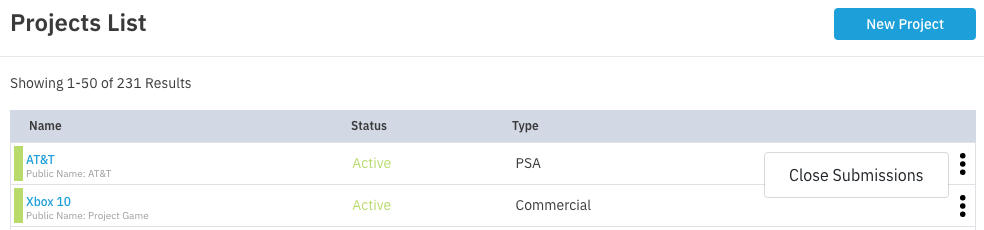
A screenshot of a **Projects List** interface. The heading reads **Projects List**, with a blue **New Project** button on the top right. Below the heading, it states **Showing 1-50 of 231 Results**. A table lists projects with columns for **Name**, **Status**, and **Type**.  ---  ## Visible Projects  * The first project listed is **AT&T** (Public Name: AT&T), which has a **Status** of **Active** and a **Type** of **PSA**. A button labeled **Close Submissions** is visible next to this project. * The second project is **Xbox 10** (Public Name: Project Game), which also has a **Status** of **Active** and a **Type** of **Commercial**.


Stop Receiving Submissions for One Role

If you only want to close submissions for a specific role while keeping others open:

  1. Click on the project title.

  2. Click the overflow menu () next to the specific role.

  3. Click Close Submissions.

  4. Confirm by clicking Yes, Close Submissions.

Was this article helpful?

Sorry about that! Care to tell us more?

Thanks for the feedback!

There was an issue submitting your feedback
Please check your connection and try again.