
CASTING DIRECTORS: How do I request additional submissions for a published project?
This article provides instructions on how to request more submissions for specific roles after a project has already been published, ensuring you find the right talent for your project.
Requesting Additional Submissions
Yes! Once the project has been published, you can choose to "Request Additional Submissions" to view more options.
Sign in to CastingNetworks.com.
Click on the project title.
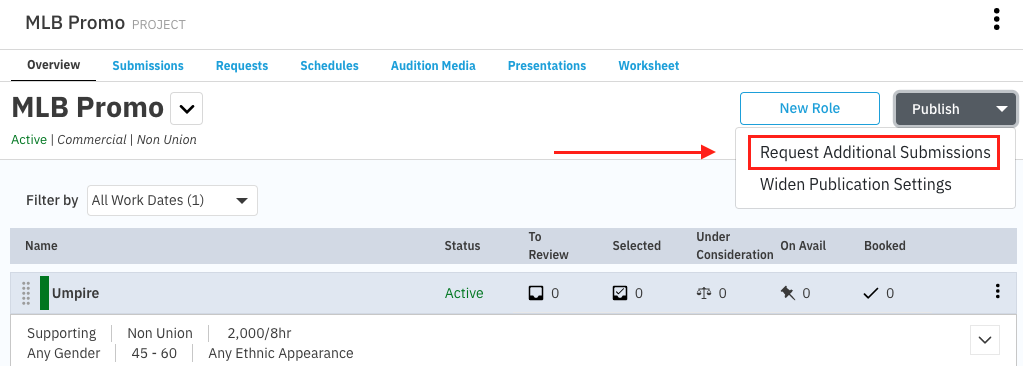
Click Publish.
Select Request Additional Submissions.
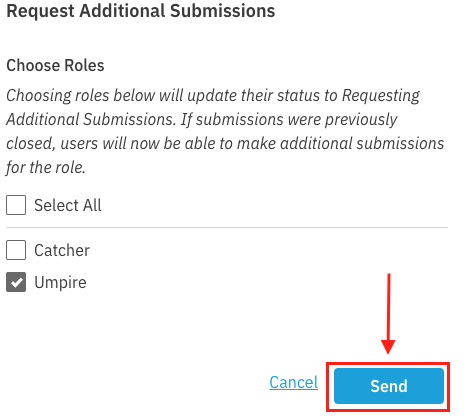
Choose which role(s) for which you would like to receive more submissions.
Note: Only roles with the status ‘Active’ and ‘Submissions Closed’ will be available to request additional submissions.
Optionally, include a message to talent representatives and talent.
Click Send.
The talent representatives and talent will be notified of this request and the roles will display as Requesting Additional Submissions.