
CASTING DIRECTORS: What's an Internal Project Name?

Edited

This article answers what an internal project name is and how it is only visible to them and their clients when viewing an Audition Presentation.


Adding an Internal Project Name

  1. When creating your project, check the Use a different internal project name box.

  2. Enter the internal project name and proceed with creating the project as normal.
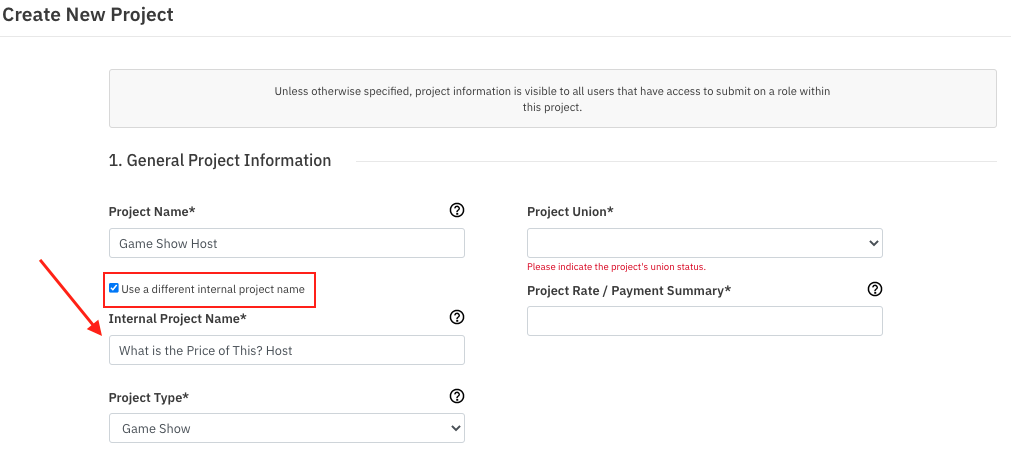
    A screenshot of a "Create New Project" form titled "1. General Project Information." The form fields shown are: "Project Name*" (pre-filled as "Game Show Host"), a checkbox labeled "Use a different internal project name" which is checked, and an "Internal Project Name*" field below it (pre-filled as "What is the Price of This? Host"). An arrow points from the "Use a different internal project name" checkbox to the "Internal Project Name*" field. Other fields visible include "Project Union*" (a dropdown with a required status message), "Project Rate / Payment Summary*", and "Project Type*" (a dropdown pre-filled as "Game Show").

    This internal name will be visible to you or to any clients viewing an Audition Presentation for the project. 

  • Helpful Tip: Each role added to a project can also have an internal name only visible to you or clients.

Was this article helpful?

Sorry about that! Care to tell us more?

Thanks for the feedback!

There was an issue submitting your feedback
Please check your connection and try again.