
CASTING DIRECTORS: How do I know if talent has been selected for multiple roles?

Edited

This article is for Casting Directors and Project Creators. It explains how to identify if talent has already been submitted or selected for other roles within your project using the Multiple Selection Banner, ensuring you avoid selecting the same talent for conflicting roles.


Identifying Status Banners

Talent submitted or selected for multiple roles will now be flagged directly on the submissions page to help you track their status across your project.

If you have already selected a talent for another role, an orange banner stating Selected for other roles will appear at the top of the headshot.
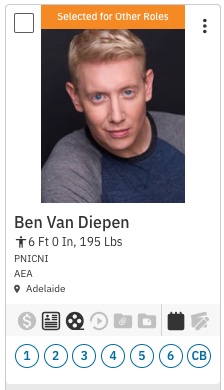
A headshot of a fair-skinned person with short, light blonde hair and blue eyes, looking directly at the camera. They are wearing a grey and blue raglan-sleeve shirt. The image is part of a casting profile card for "Ben Van Diepen," who is listed as $6 	ext{ Ft } 0 	ext{ In, } 195 	ext{ Lbs}$ and based in Adelaide. The card also includes icons for various professional and logistical details. The card is marked "Selected for Other Roles."

Any talent that is submitted on multiple roles but not yet selected for any will present the blue banner Submitted for other roles.
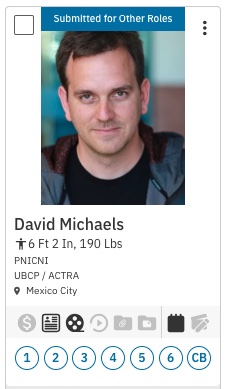
A headshot of a fair-skinned man with short, brown hair and a slight smile, looking directly at the camera. He's wearing a dark, possibly grey, hoodie over a black shirt. The image is part of a casting profile card for **David Michaels**, who is listed as $6 	ext{ Ft } 2 	ext{ In, } 190 	ext{ Lbs}$ and based in **Mexico City**. The profile is associated with the unions **UBCP / ACTRA**. The card is marked "**Submitted for Other Roles**."

Selection Warnings

To help manage your casting decisions, the system will alert you if you attempt to move a talent forward who is already engaged in another role.

If you select a talent for a role that has already been selected for another role, the following warning will appear:
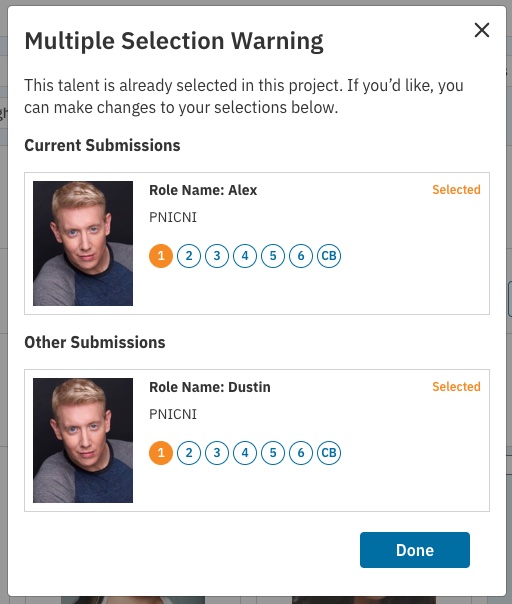
A modal window titled **"Multiple Selection Warning"** displays a message that "This talent is already selected in this project." Below the warning, two sections list the current and other submissions for the talent.  ## Current Submissions  * **Role Name:** Alex     * **Status:** Selected     * **Talent Image:** A headshot of a fair-skinned person with short, light blonde hair and blue eyes, wearing a grey and blue raglan-sleeve shirt.     * **Details:** PNICNI, followed by a row of numbered circles (1 through 6) and a "CB" circle.  ---  ## Other Submissions  * **Role Name:** Dustin     * **Status:** Selected     * **Talent Image:** The same headshot of the fair-skinned person with short, light blonde hair.     * **Details:** PNICNI, followed by a row of numbered circles (1 through 6) and a "CB" circle.  ---  A **"Done"** button is at the bottom right of the modal.

If you select a talent for a role that has already been added to a Media Request, Audition, or Schedule for another role, the following warning will appear:
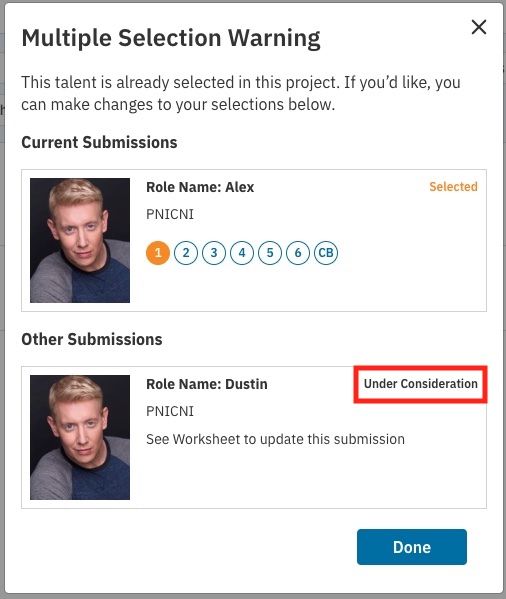
A modal window titled **"Multiple Selection Warning"** displays a message that "This talent is already selected in this project. If you'd like, you can make changes to your selections below."  ---  ## Current Submissions  The current submission is for the **Role Name: Alex**, and the status is **Selected**. The card shows a headshot of a fair-skinned person with short, light blonde hair and blue eyes. Details include **PNICNI** and a row of numbered circles (1 through 6) and a **CB** circle.  ---  ## Other Submissions  The other submission is for the **Role Name: Dustin**. The card displays the same headshot. The status for this role is shown in two different images:  1.  In one state, the status is **"Under Consideration"** and includes the note, "See Worksheet to update this submission." 2.  In a second state (after a presumed change), the status is **"Selected."**  ---  A **"Done"** button is at the bottom right of the modal window in all variations.

Deselect Warnings

The system also tracks status changes to keep your workflow clear. If you select a talent for a role that has already been selected or is under consideration for another role, and then deselect them, the following warning will appear:
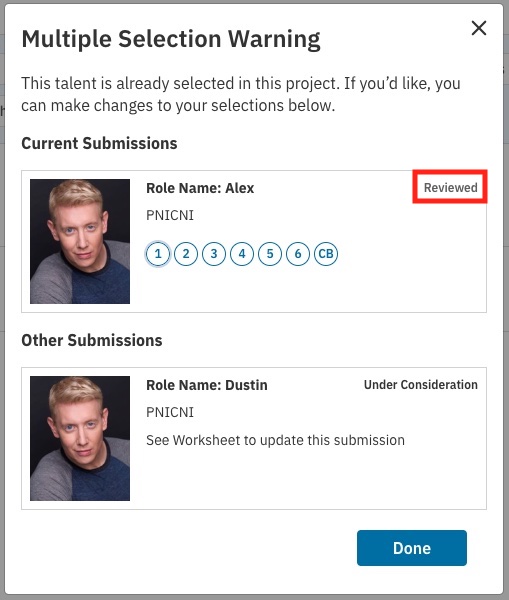
The provided images show different statuses for talent submissions in a casting project, specifically within a **"Multiple Selection Warning"** window that appears when a talent is selected for more than one role.  ---  ## 🎭 Submission Statuses Observed  The status of the talent submission for the **Role Name: Alex** is shown as either **Selected** or **Reviewed**:  * **Selected:** This status appears when the submission for Alex is currently **Selected** and the submission for Dustin is either **Under Consideration** or also **Selected**. * **Reviewed:** This status appears when the submission for Alex has been **Reviewed** while the submission for Dustin is **Under Consideration**.  The status of the talent submission for the **Role Name: Dustin** is shown as either **Under Consideration** or **Selected**:  * **Under Consideration:** This status is shown when the submission for Dustin is actively being considered, with a note to "See Worksheet to update this submission." * **Selected:** This status is shown when the talent has been chosen for both the Alex role and the Dustin role, resulting in the **"Multiple Selection Warning."**  ---  ## 🚫 Multiple Selection Warning  The warning indicates that the **"talent is already selected in this project,"** and allows the user to **"make changes to your selections below."**  * In one state, the talent is **Selected** for **Alex** and **Selected** for **Dustin**. * In another state, the talent is **Selected** for **Alex** and **Under Consideration** for **Dustin**. * In a third state, the talent has been **Reviewed** for **Alex** and is **Under Consideration** for **Dustin**.  The goal of this warning is to alert the casting professional that the same individual has been chosen or is being considered for multiple parts within the same project.  Would you like me to clarify the difference between any of these submission statuses, such as **Selected** vs. **Under Consideration**?

*Please note this warning will only appear for talent when multiple profiles are connected to the same talent account.

Was this article helpful?

Sorry about that! Care to tell us more?

Thanks for the feedback!

There was an issue submitting your feedback
Please check your connection and try again.