
CASTING DIRECTORS: What is a folder within a presentation?
This article is for casting directors who want to stay organized while managing audition content. A folder is a tool inside a presentation that lets you group and label your media so everything is easy to find. Whether you are sorting by day, role, or tape type, folders help keep your casting sessions clean and structured.
What is a folder?
A folder is an organizational tool within a presentation used to group a collection of media from your audition sessions. Folders can be labeled anything that works for your workflow. Common examples include:
"Day 1" to capture all content from the first day of casting
"Self Tapes" to separate remotely submitted material
A specific role name to keep auditions for that role together
How to add a folder to a presentation
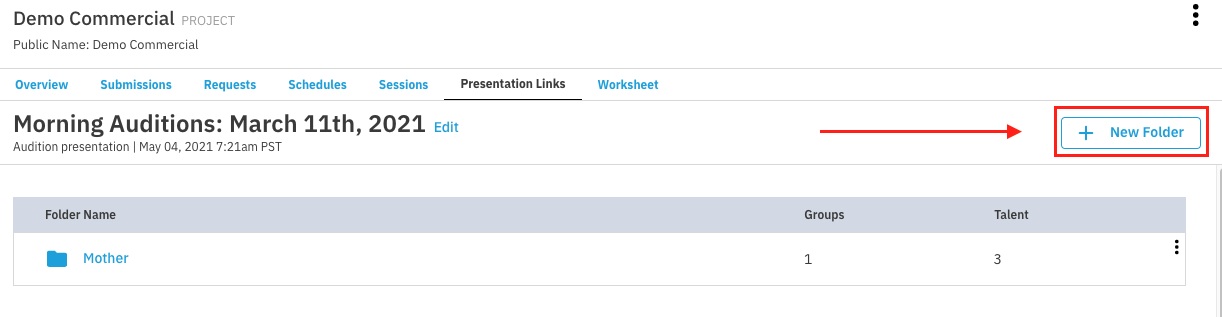
Go to the presentation and select + New Folder.
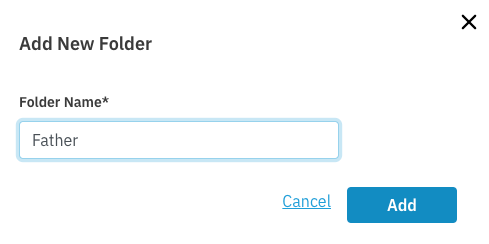
Enter a folder name and select Add.
What to do after creating a folder
Once a folder is created, you have two options for adding content to it:
Add an empty group directly within the folder.
Go to Sessions to add content gathered from FastCapture or Request Media.