CASTING DIRECTORS: How do I view contact information for Talent and Talent Representatives?

Edited

This article explains where to locate contact details for talent or their representation. It covers where to find phone numbers and email addresses within the project view to help facilitate communication.


Talent Representative Contact Information

You can see the talent representative's phone number displayed at the bottom of the talent's submission card.
A phone icon next to the number $+61234456789$ followed by "(Rep)" in parentheses. The whole element is contained within a light gray rectangular box.

Talent's Contact Information

To view a talent's specific contact information, please follow the steps below:

  1. Go to the Submissions tab of your project.

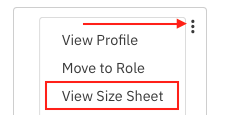
  2. Click on the three dots located on the upper right of the talent's headshot.

  3. Select View Size Sheet

     A context menu with three options: "View Profile," "Move to Role," and "View Size Sheet." A red rectangle highlights "View Size Sheet," and a red arrow points from the top option toward a vertical three-dot more options icon in the top right corner of the menu.

  4. The talent's email address and phone number, as well as the talent representative's phone number, will display. 
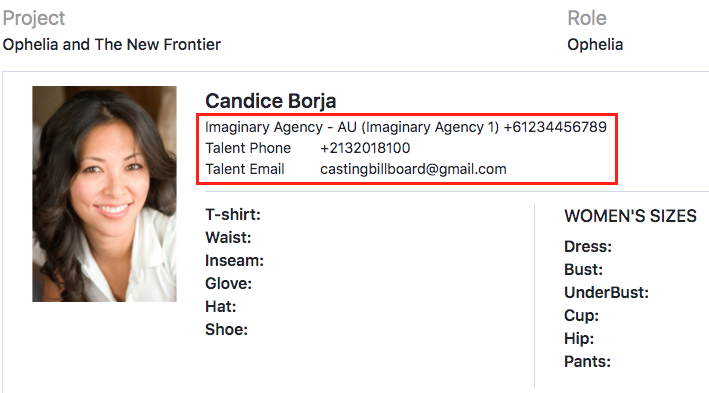
    A headshot of a smiling woman, Candice Borja, is shown next to her casting details. The details include the **Project: Ophelia and The New Frontier** and **Role: Ophelia**. A red box highlights her **Agency**, **Talent Phone** number (+2132018100), and **Talent Email** (castingbillboard@gmail.com). Below this are fields for her clothing sizes, including **T-shirt**, **Waist**, **Inseam**, **Glove**, **Hat**, **Shoe** for standard sizes, and **Dress**, **Bust**, **UnderBust**, **Cup**, **Hip**, and **Pants** for women's sizes.

Was this article helpful?

Sorry about that! Care to tell us more?

Thanks for the feedback!

There was an issue submitting your feedback
Please check your connection and try again.