
CASTING DIRECTORS: Can I request talent with a specific selection number?
Yes! Casting directors on Casting Networks can absolutely add talent to a request using their selection number. This article walks you through how to use the +Add Talent option when building out a request, so you can quickly pull in the right talent from your project.
How to Add Talent by Selection Number to a Request
While creating your request, look for the +Add Talent option.
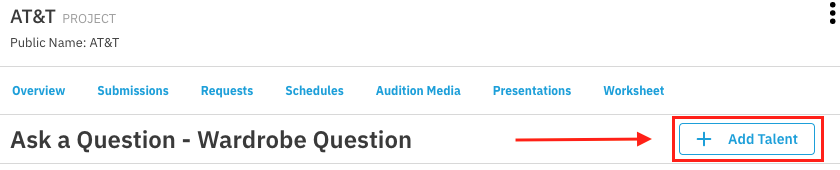
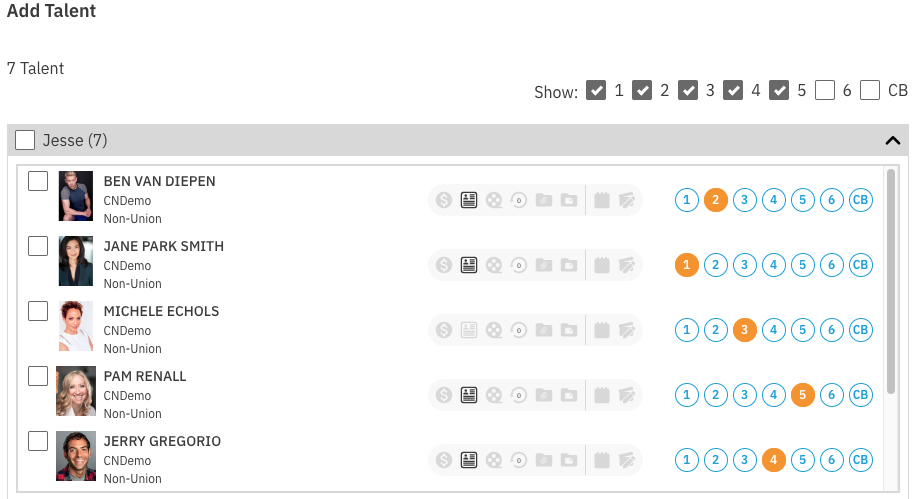
Clicking +Add Talent will open a modal showing all selected talent in the project, along with their selection numbers. From there:
Locate the talent you want to add using their selection number.
Use the filter option to narrow talent down by their selection tag.
Click the checkbox next to the role name to add all talent - or all filtered talent - to the role.
That's it! Once you've made your selections, the talent will be added to the request and you can continue building it out from there.